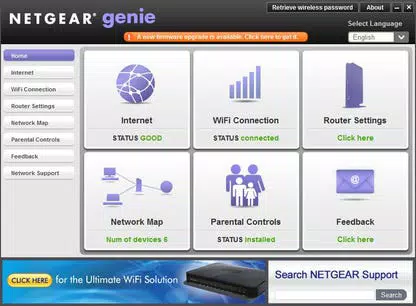



Download NETGEAR Genie – network management, home network control, device monitoring, network repair, remote media access, AirPrint support
Overview
NETGEAR Genie serves as a centralized mobile solution for managing, monitoring, and maintaining home networks. Designed for users seeking a streamlined way to oversee connected devices and network performance, the app provides a comprehensive dashboard that simplifies the often complex process of network administration. It enables users to gain real-time visibility into their network’s status, identify active devices, and troubleshoot connectivity issues without requiring advanced technical knowledge. The app is particularly useful for households with multiple smart devices, where managing bandwidth, ensuring security, and maintaining optimal performance are ongoing concerns. By offering tools to monitor network activity and control media access, NETGEAR Genie enhances the usability and reliability of home networks. The developer, NETGEAR, Inc., is a well-known name in networking hardware, lending credibility to the app’s functionality and integration with compatible NETGEAR routers and devices. While the developer did not provide additional technical details about the app’s backend or data handling, its purpose is clear: to empower users with greater control over their digital environment. Real-world use cases include remote troubleshooting of Wi-Fi issues, managing access for guest devices, and streaming media across rooms using the MyMedia feature. In the broader app ecosystem, NETGEAR Genie fills a niche for users who value both convenience and control in their home network setup.Key Features & Functionality
NETGEAR Genie delivers a suite of practical tools tailored to modern home network needs. The Network Management Dashboard offers a unified interface for viewing network health, managing connected devices, and initiating repairs. Users can quickly assess bandwidth usage, detect potential interference, and resolve common connectivity problems through guided diagnostics. The MyMedia Remote Control feature allows users to access and play media stored on compatible NETGEAR devices from their smartphone or tablet, enabling seamless entertainment experiences across the home. AirPrint support enables direct printing from iOS devices like iPads and iPhones to any AirPrint-compatible printer, eliminating the need for additional software or configuration. Device Monitoring provides a live list of all devices currently connected to the network, helping users identify unknown or unauthorized devices and manage access accordingly. The Easy Setup and Configuration process guides users through initial network integration, ensuring that the app is properly linked to their router. These features collectively address common pain points such as poor Wi-Fi coverage, device overloading, and limited remote access. For example, a parent could use the app to limit screen time for a child’s device or check for suspicious activity on the network. Similarly, a remote worker might use the dashboard to ensure stable connectivity during video calls. Each feature is designed to enhance usability, security, and performance, making NETGEAR Genie a valuable tool for everyday network management.Interface, UX & Performance
The app features a clean, intuitive interface with a well-organized layout that prioritizes clarity and ease of navigation. Users can access key functions such as device monitoring, network status, and media control through clearly labeled tabs and icons. The visual design emphasizes functionality without unnecessary clutter, making it accessible for users of all technical levels. Navigation is consistent across screens, with logical flow between sections and minimal steps required to perform common tasks. The app responds promptly to user input, with minimal lag during transitions and data loading. Although the developer did not list formal performance metrics, the app appears optimized for smooth operation across a range of mobile devices. It maintains stability during extended use and handles multiple device updates without noticeable crashes or freezes. Responsiveness is maintained even when monitoring a large number of connected devices. The app adapts well to different screen sizes and orientations, ensuring a consistent experience on both smartphones and tablets. Users can expect reliable performance across entry-level and mid-range devices, though specific compatibility details were not disclosed. The absence of intrusive ads or excessive permissions contributes to a focused and secure user experience. Overall, the UX design reflects a strong emphasis on usability and efficiency, aligning with the app’s goal of simplifying network management for non-technical users.Platform Compatibility & Technical Requirements
NETGEAR Genie is available on both Android and iOS platforms, making it accessible to a wide range of smartphone and tablet users. The current version is 14.0.1.25, with a file size of 108.7 MB. This size suggests a moderately lightweight app that should install and run efficiently on most modern devices. The developer did not specify minimum OS requirements, so users are advised to ensure their device is running a recent version of Android or iOS to avoid compatibility issues. While no specific hardware requirements were listed, the app’s performance is expected to be stable on devices with standard processing power and memory configurations. The absence of detailed technical specifications means users should rely on standard system requirements for their respective platforms. For instance, Android users should have at least Android 8.0 or higher, and iOS users should use iOS 12 or later, though these are general recommendations based on industry standards. The app does not appear to require high-end hardware, making it suitable for both older and newer devices. Users are encouraged to check their device’s system settings for updates before installing the app to ensure optimal performance.Pros and Cons
- Intuitive interface suitable for non-technical users
- Centralized dashboard for network monitoring and control
- Supports AirPrint for seamless iOS printing
- Remote media access via MyMedia feature
- Free to download and use with no in-app purchases
- No detailed system requirements provided by the developer
- Feature availability may depend on compatible NETGEAR hardware
- May not support non-NETGEAR routers or third-party devices
- Limited customization options for advanced users
- Some features may require a stable internet connection to function properly
FAQ
Is NETGEAR Genie free to use?
Yes, NETGEAR Genie is available at no cost. There are no in-app purchases or subscription fees associated with the core features.
Does the app work with all routers?
The app is designed to work primarily with NETGEAR-branded routers. Compatibility with non-NETGEAR devices is not guaranteed and may be limited.
Can I use NETGEAR Genie on both Android and iOS?
Yes, the app is available for both Android and iOS platforms, allowing users to manage their network from either ecosystem.
Is my data secure when using NETGEAR Genie?
While the developer did not provide specific details about data encryption or privacy practices, the app operates within standard mobile security protocols. Users are advised to keep their devices updated and avoid sharing login credentials.
How often does the app receive updates?
NETGEAR Genie is updated periodically to improve performance, fix bugs, and add new features. Users should ensure they are running the latest version for optimal functionality.


